If you've ever worked with Google Maps data - building an app, doing local SEO, running a scraping project - you've probably bumped into terms like "Place ID," "CID," and "Google ID." They sound like they might be the same thing, but they're not. And the documentation around them is, to put it politely, scattered.
I spent an embarrassing amount of time sorting this out when I first started working with Maps data, so let me save you the trouble. This guide covers what each identifier actually is, how they're different, how to find yours, and which one you should care about depending on what you're trying to do.
Wait, Why Does Google Have Three Different IDs?
Good question. The short answer is that different Google systems were built at different times by different teams, and each one needed its own way to identify locations. Over the years, these systems grew alongside each other rather than being unified into one clean ID. Classic Google.
Here's what each one is:
Place ID
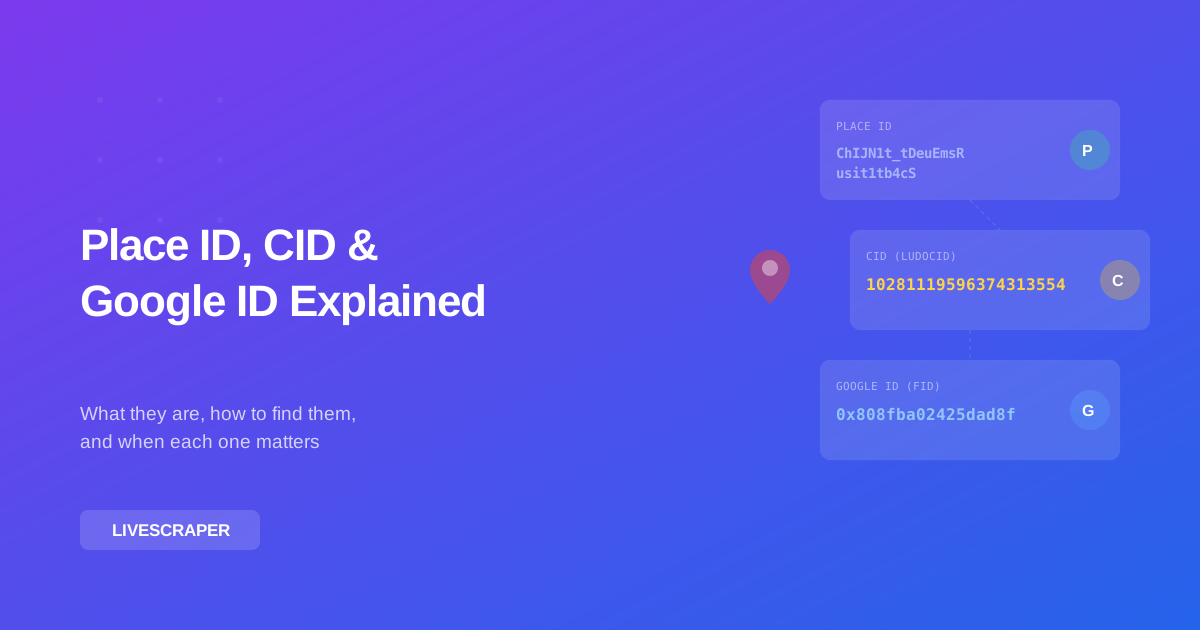
This is the one you'll encounter most often. It's a text string that looks something like ChIJN1t_tDeuEmsRusit1tb4cS - always starts with "ChIJ" followed by a bunch of seemingly random characters. Google introduced Place IDs as the standard way for developers to reference locations through their APIs.
A few things to know about Place IDs:
- They're the official, recommended identifier for the Maps Platform APIs
- They can expire or change - Google says they're valid for about 12 months, though in practice many last much longer
- Every place on Google Maps has one - businesses, parks, addresses, even specific buildings
- You need them to make API calls like Place Details, Place Photos, and to build review links
CID (Also Called Ludocid)
The CID is a long numeric identifier - something like 10281119596374313554. It's tied specifically to Google Business Profiles (what used to be called Google My Business). Unlike Place IDs, CIDs are permanent. They don't expire, they don't rotate. Once a business gets a CID, that number stays with it.
You'll sometimes see it called "ludocid" - that's just the parameter name Google uses internally. If you've ever seen a Maps URL with ?cid=1234567890 at the end, that's the CID.
Key facts:
- Permanent identifier - doesn't change or expire
- Only assigned to verified business listings, not general locations
- Used heavily in local SEO for tracking and linking to specific business profiles
- Can be converted to/from Place IDs (though the Place ID might change over time, the CID won't)
Google ID (Feature ID / FID)
This is the one most people never deal with directly. It's a hexadecimal string like 0x808fba02425dad8f that Google uses internally to link data across their various services - Maps, Search, Knowledge Graph, etc.
Unless you're doing something really technical or digging deep into Google's internal data structures, you probably don't need to worry about this one. I'm including it here for completeness, but for most practical purposes, Place ID and CID are the ones that matter.
Place ID vs CID vs Google ID - Quick Comparison
Here's the cheat sheet:
| Place ID | CID (Ludocid) | Google ID (FID) | |
|---|---|---|---|
| Format | Text string (ChIJ...) | Numeric (long integer) | Hexadecimal (0x...) |
| Example | ChIJN1t_tDeuEmsR | 10281119596374313554 | 0x808fba02425dad8f |
| Permanent? | No - can expire (~12 months) | Yes - never changes | Yes - rarely changes |
| Applies to | All places (businesses, addresses, landmarks) | Verified business listings only | All Google-indexed entities |
| Primary use | API calls, building links | Local SEO, permanent references | Internal Google systems |
| How to find | Place ID Finder, APIs, URL inspection | Maps URL (?cid=), DevTools | Maps URL (data parameter) |
How to Find Your Google Place ID
There are several ways to look up a Place ID. Some are quicker, some give you more data. Here are the ones I actually use:
Method 1: Google's Official Place ID Finder
The simplest approach. Google has a tool specifically for this:
- Go to the Google Place ID Finder page
- Type the business name or address into the search box on the map
- Click on the result - the Place ID appears in an info box below the map
- Copy it
It works, but it's slow if you need to look up more than a few places. You have to search and click one at a time.
Method 2: Look at the Google Maps URL
When you search for a place on Google Maps and click on it, look at the URL in your browser. You'll often see something like:
https://www.google.com/maps/place/Some+Business/@34.052,-118.243,17z/data=!3m1!4b1!4m5!3m4!1s0x80c2c7b85dea2a93:0x1ff47c3ceb7d520b!8m2!3d34.052!4d-118.243See that part after !1s? The 0x80c2c7b85dea2a93:0x1ff47c3ceb7d520b - that's actually the Google Feature ID. The Place ID isn't directly in the URL in most cases, but you can get it from the API using the coordinates or business name from the URL.
Method 3: Using the Places API
If you're a developer, you can query the Places API directly:
// Find Place from Text
GET https://maps.googleapis.com/maps/api/place/findplacefromtext/json
  ?input=Eiffel+Tower
  &inputtype=textquery
  &fields=place_id,name,formatted_address
  &key=YOUR_API_KEY
The response includes the Place ID. This is the most reliable method but requires an API key and costs money (about $17 per 1,000 requests).
Method 4: Extract Them in Bulk with Livescraper
If you need Place IDs for dozens or hundreds of businesses - say, every dentist in Chicago or every restaurant in a particular neighborhood - doing it one at a time doesn't make sense.
Livescraper's Google Maps Scraper extracts Place IDs automatically alongside all the other business data (name, address, phone, email, website, reviews, rating). You just enter your search query and location, and it pulls everything into a spreadsheet. Way faster than using the Place ID Finder tool hundreds of times.
Method 5: Browser Extensions
Extensions like GMB Everywhere or PlePer can show you the Place ID (and CID) right on the Google Maps page as you browse. Install one, navigate to a business on Maps, and the IDs appear in an overlay. Handy for quick lookups when you're already on Google Maps.
How to Find a Business CID
CIDs are a bit trickier to find because Google doesn't advertise them the way they do Place IDs. But there are a couple reliable methods:
Method A: Check the Maps URL
Search for a business on Google (regular search, not Maps). When the Knowledge Panel appears on the right side, right-click on the business name link and copy the URL. It often contains a cid parameter:
https://maps.google.com/?cid=10281119596374313554That number at the end - 10281119596374313554 - is the CID.
Sometimes the URL format is different and you won't see the cid parameter directly. In that case, try the next method.
Method B: Use Browser Developer Tools
This is nerdier but it always works:
- Search for the business on Google
- Right-click on the Knowledge Panel and click "Inspect" (or press F12)
- In the Elements panel, search for
ludocidordata-cid - You'll find the CID value in the HTML attributes
It's hidden in the page source, but it's there.
Method C: Convert From Place ID
If you already have the Place ID, you can get the CID through the Places API by requesting the url field - the canonical Google Maps URL for the place usually contains the CID. Or use a conversion tool that maps between the two.
Which ID Do You Actually Need?
This depends on what you're building or what kind of work you're doing. Let me break it down:
If You're a Developer Building an App
You need Place IDs. The Maps Platform APIs all work with Place IDs. You'll use them to fetch business details, embed maps, calculate routes, and display place information in your app. Just remember they can expire, so if you're storing them in a database, you should refresh them periodically.
If You're Doing Local SEO
You probably want CIDs. Since CIDs are permanent and tied directly to business profiles, they're more reliable for long-term tracking. A lot of SEO tools use CIDs under the hood for monitoring business listings, tracking ranking changes, and linking directly to specific Google Business Profiles.
That said, you'll still need Place IDs for things like generating review links (more on that in a second).
If You're Doing Market Research or Lead Generation
You need the data more than you need the IDs themselves. Tools like Livescraper handle the IDs behind the scenes and give you what you actually care about: business names, contact info, reviews, ratings. The Place IDs come along for the ride in the export, but they're not usually the point.
If You're a Marketer Generating Review Links
You need Place IDs. The standard Google review link format is:
https://search.google.com/local/writereview?placeid=YOUR_PLACE_IDPaste your Place ID in there and you've got a direct link that takes customers straight to the review form. Super useful for email campaigns, QR codes, receipts, and follow-up messages. We actually wrote a whole guide on getting more Google reviews if you want more ideas on how to use these links effectively.
Do Place IDs Actually Expire?
Officially, yes. Google's documentation says Place IDs should be considered valid for about 12 months. After that, the same physical location might get a new Place ID.
In practice? I've seen Place IDs last for years without changing. But I've also seen them change unexpectedly - usually when a business updates their listing, moves to a new address, or when Google does some kind of backend data merge.
My advice:
- Don't treat Place IDs as permanent keys in your database. If you're storing them, build in a mechanism to refresh them.
- Store the CID alongside the Place ID whenever possible. If the Place ID changes, you can use the CID to look up the new one.
- For one-off tasks - like generating a review link or checking a business listing - don't worry about expiration. Just grab the current Place ID and use it.
Also worth noting: Google deprecated the legacy Places API in 2024 and the new version (Places API New) handles IDs slightly differently. If you're working with old code that uses the original Places API, you might want to update your integration to make sure Place IDs are being refreshed properly.
Practical Things You Can Do With These IDs
Now that you know what they are, here's what you can actually do with them:
1. Create Google Review Links
Already mentioned this one, but it's probably the most common use case. Plug your Place ID into this URL:
https://search.google.com/local/writereview?placeid=ChIJN1t_tDeuEmsRusit1tb4cSSend that to customers via email, text, or print it as a QR code. They'll land directly on the review form for your business.
2. Embed a Specific Place on Your Website
The Maps Embed API accepts Place IDs:
<iframe
  width="600"
  height="450"
  style="border:0"
  loading="lazy"
  src="https://www.google.com/maps/embed/v1/place
    ?key=YOUR_API_KEY
    &q=place_id:ChIJN1t_tDeuEmsRusit1tb4cS"
></iframe>
This gives you a clean, specific map embed rather than a generic search result.
3. Pull Detailed Business Data via API
With a Place ID, you can call the Place Details endpoint to get everything Google knows about that business - hours, phone number, website, photos, reviews (though only 5 reviews through the API - for all reviews, use Livescraper's Reviews Scraper).
4. Track Local SEO Performance
Using CIDs, you can set up monitoring for specific business listings across search results. Many local SEO tools accept CIDs to track how a business appears in the local pack, knowledge panel, and Maps results over time.
5. Bulk Data Projects
Working on something bigger - like building a database of all coffee shops in New York, or finding every auto repair shop with less than a 4-star rating? That's a bulk extraction job. Livescraper handles this by searching Google Maps based on your keywords and location, then exporting all the business data (including Place IDs) into CSV or JSON.
Need emails from those businesses for outreach? The Email Scraper can pull email addresses from business websites automatically. And if you want pre-built lead lists, the B2B Lead Database has verified contact data ready to go.
Common Mistakes to Avoid
A few things I've seen people get tripped up on:
- Confusing Place ID with CID. They're different things. A Place ID is a text string starting with "ChIJ." A CID is a long number. Don't mix them up in your code or your API calls won't work.
- Assuming Place IDs last forever. They don't. Build in refresh logic if you're storing them long-term.
- Using the wrong ID for review links. Review links need Place IDs, not CIDs. The
writereviewURL only works withplaceid=. - Hardcoding IDs without a fallback. If a Place ID expires and your app relies on it, things break. Always have a way to look up a fresh ID if the stored one stops working.
- Manually looking up IDs for large lists. If you need IDs for more than 10-20 places, manual lookup is a waste of time. Use the API or a tool like Livescraper to do it in bulk.
Wrapping Up
Here's the too-long-didn't-read version:
- Place ID - the standard Maps API identifier. Text format, starts with "ChIJ." Use it for API calls, review links, and embedding maps. Refreshes periodically.
- CID - a permanent numeric ID for verified businesses. Use it for SEO tracking and as a stable reference. Won't change even when the Place ID does.
- Google ID (FID) - a hex string used internally by Google. You probably don't need to deal with it directly.
For most people, the Place ID is what you need day-to-day. Keep the CID around as your permanent anchor. And if you need to work with these IDs at any kind of scale - extracting data from dozens or hundreds of businesses - Livescraper saves you a ton of time by pulling everything at once.
Now go build something cool with that data.
Frequently asked questions
What is a Google Maps Place ID?
A Place ID is a text identifier that Google assigns to every location on Google Maps. It looks like "ChIJN1t_tDeuEmsRusit1tb4cS" and is used to reference places in Google's Maps Platform APIs. You need a Place ID to fetch business details, embed maps, or create direct review links. They can expire after about 12 months, though many last longer in practice.
What is the difference between Place ID and CID?
Place IDs are text strings (starting with "ChIJ") that can expire and apply to any location on Google Maps. CIDs are permanent numeric identifiers assigned only to verified business listings. Think of the CID as the stable, permanent reference and the Place ID as the working API key that might need refreshing. For SEO tracking, use CIDs. For API calls and review links, use Place IDs.
How do I find the Place ID for a business on Google Maps?
The easiest way is to use Google's official Place ID Finder tool at developers.google.com. Search for the business, click on the result, and the Place ID appears. For bulk lookups, you can use the Places API or a tool like Livescraper that extracts Place IDs automatically alongside other business data.
Do Google Place IDs expire or change?
Yes, officially Place IDs can expire after about 12 months. In practice, many last years without changing, but they can update when a business modifies their listing, moves addresses, or when Google performs backend data merges. If you store Place IDs long-term, build in a refresh mechanism and keep the CID as a permanent fallback.
How do I create a Google review link using a Place ID?
Use this URL "format": "https"://search.google.com/local/writereview?placeid=YOUR_PLACE_ID - replace YOUR_PLACE_ID with your actual Place ID. This link takes customers directly to the review form for your business. You can share it via email, text, QR codes, or on your website.
How do I find Place IDs for many businesses at once?
For bulk lookups, manual methods are too slow. You can use the Google Places API programmatically, or use a tool like Livescraper's Google Maps Scraper which extracts Place IDs automatically along with business names, addresses, phone numbers, emails, and other data. Just enter your search query and location, and it exports everything into a spreadsheet.